
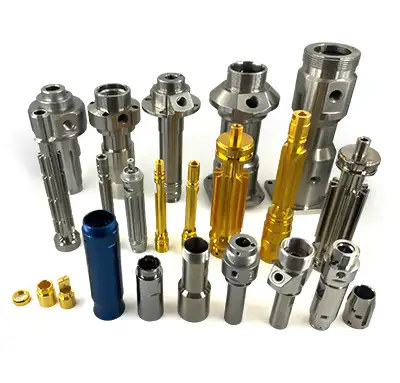
Learning how to use a CNC machine starts with more than pressing cycle start. A good operator must understand the drawing, material, workholding, cutting tools, coordinates, program verification, machining sequence, and inspection requirements. Skipping one of these steps can damage the tool, scrap the part, or create a safety risk.
This guide explains the basic CNC machine operation steps in a practical order. It is written for beginners, buyers, engineers, and shop teams who want to understand what happens before a machined part is produced by MTSPi CNC / MEITESI.
Quick Answer
To use a CNC machine, review the drawing, prepare the material, secure the workpiece, install the correct tools, set the work coordinate system, load and verify the program, run a simulation or dry run, start machining under supervision, inspect the finished part, and record any required adjustments. The exact steps depend on the machine type, part geometry, material, tolerance, and shop procedure.
What Does It Mean to Use a CNC Machine?
Using a CNC machine means controlling a machine tool with a programmed set of movements. The program tells the machine where to move, how fast to feed, what spindle speed to use, which tool to select, and how deep to cut. But the program is only one part of the process. The setup must physically support the part, the tools must match the material, and the coordinate system must match the drawing and fixture.
In real production, CNC operation connects engineering intent with shop-floor execution. A 3D model and 2D drawing define what the part should become. The operator, programmer, and inspector make sure the machine can create that part safely and repeatably.
Basic CNC Machine Operation Process
The exact workflow varies between milling machines, turning centers, routers, grinders, EDM machines, and multi-axis equipment. However, most CNC jobs follow a similar sequence. A disciplined process reduces setup mistakes and makes quality easier to control.
| Step | Purpose | Risk if skipped |
|---|---|---|
| Review the drawing | Understand geometry, material, tolerance, and finish | Wrong feature, wrong tolerance, or missing finish requirement |
| Secure the workpiece | Hold the material rigidly and repeatably | Part movement, chatter, poor accuracy, or collision |
| Set tools and offsets | Tell the machine tool length, diameter, and cutting position | Broken tool, wrong depth, or scrapped part |
| Verify the program | Check toolpath, clearance, speeds, and sequence | Machine crash or incorrect machining route |
| Inspect the part | Confirm dimensions and surface requirements | Undetected defects reach assembly or shipment |
Step 1: Review the Drawing and Machining Requirements
Before touching the machine, review the engineering drawing, 3D model, material specification, revision number, tolerance notes, thread callouts, surface finish requirements, and inspection needs. The operator should know which dimensions are critical and which surfaces are cosmetic or functional.
If the job includes tight tolerances, thin walls, special threads, deep pockets, or difficult materials, these details should be discussed before setup. MTSPi CNC often reviews drawings through CNC machining drawing preparation so process risks are clear before cutting starts.
Step 2: Prepare the Material
The raw stock must match the material grade, size, and condition required for the job. The operator checks whether the material is aluminum, stainless steel, brass, copper, titanium, engineering plastic, or another specified grade. Stock should be large enough for machining allowance but not so oversized that it wastes time and material.
Material preparation may include cutting stock to length, cleaning surfaces, deburring saw-cut edges, marking orientation, and confirming certificates if required. For high-value parts, material traceability and lot control may also matter.
Step 3: Secure the Workpiece
Workholding is one of the most important parts of CNC operation. The workpiece may be held in a vise, chuck, collet, fixture plate, soft jaws, clamps, vacuum table, or custom fixture. The setup must be rigid enough to resist cutting force while leaving tool access to the required features.
Poor workholding causes vibration, dimensional error, surface marks, and safety problems. For thin or delicate parts, clamping pressure must be controlled so the part does not deform before machining. For repeat jobs, a stable fixture helps improve consistency.
Step 4: Install the Correct Cutting Tools
Cutting tools must match the material, feature type, and machining sequence. A milling job may use end mills, drills, chamfer tools, taps, reamers, face mills, or ball-nose cutters. A turning job may use inserts, boring bars, threading tools, grooving tools, and drills.
Each tool needs the correct holder, projection length, tool number, offset, and condition check. Worn or chipped tools can create poor surface finish, oversized holes, burrs, or broken edges. Tool length should be as short as practical to improve rigidity.
Step 5: Establish the Work Coordinate System
The work coordinate system tells the CNC machine where the part zero is located. Common offsets include G54, G55, G56, and related work offsets. The zero point may be set at a corner, center, top face, fixture datum, or another reference defined by the setup plan.
This step is critical. If the work offset is wrong, the toolpath may cut in the wrong location even if the program itself is correct. Operators may use an edge finder, probe, dial indicator, gauge block, or touch-off method to establish the coordinate system.
Step 6: Load and Verify the CNC Program
The CNC program may come from CAM software, manual G-code, or a proven shop template. Before running it, the operator verifies tool numbers, spindle speeds, feed rates, coolant commands, work offset, clearance planes, tool changes, and safe retract moves.
For a new part, program verification should include simulation, backplot review, or a machine control preview when available. The goal is to catch toolpath errors before the cutter reaches the material.
Step 7: Run a Dry Run, Simulation, or Single-Block Check
A dry run checks the machine movements without cutting full material, often with reduced feed, increased distance from the workpiece, or single-block operation. Some shops use graphics simulation first, then air-cut the first toolpath, then cut cautiously while monitoring load and sound.
This step helps catch wrong offsets, tool number mistakes, unsafe rapid moves, and clearance problems. It is especially important for complex fixtures, long tools, expensive material, and first-article parts.
Step 8: Start the Machining Process
When the setup and program are verified, machining can begin. The operator monitors spindle load, coolant flow, chip evacuation, tool sound, vibration, and part stability. Early in a new job, it is common to stop after roughing or after the first critical feature to inspect the result.
If a dimension is trending high or low, the operator may adjust offsets within the approved process. Any change should be controlled so later parts remain consistent. For production work, approved setup sheets and inspection records help maintain repeatability.
Step 9: Inspect the Finished Part
Inspection confirms whether the part meets the drawing. Basic checks may use calipers, micrometers, thread gauges, plug gauges, height gauges, surface roughness tools, or a CMM depending on the tolerance and feature type.
The first article is especially important. If the first piece is correct, the process can often continue with sampling checks. If the first piece is incorrect, the team should identify whether the issue comes from programming, setup, tool wear, material movement, or inspection method.
How to Operate a CNC Machine Safely
- Wear proper eye protection and follow shop safety rules.
- Keep hands away from rotating tools, moving tables, chucks, and chip conveyors.
- Never reach into the machine while the spindle is running.
- Confirm that clamps, vises, and fixtures are tight before cycle start.
- Use the door interlock, emergency stop, and feed hold correctly.
- Remove chips with a brush, hook, or approved tool, not bare hands.
- Keep the work area clean so tools, gauges, and stock do not create hazards.
Common Mistakes When Using a CNC Machine
Beginner mistakes usually come from rushing setup verification. Common problems include using the wrong work offset, forgetting a tool length offset, loading the wrong revision of the program, clamping on an unstable surface, using a worn tool, choosing unsuitable feeds and speeds, or skipping first-piece inspection.
Another common mistake is treating the CNC machine as if the program alone guarantees quality. The program matters, but the real result depends on material, machine condition, tool condition, workholding, coolant, temperature, measurement, and operator discipline.
CNC Operation vs CNC Programming
CNC programming creates the instructions for the machine. CNC operation prepares the machine, loads the tools and workpiece, sets coordinates, verifies the program, runs the job, and checks the part. In small shops, one person may do both. In larger production environments, programming and operation may be separate roles.
A good operator does not need to write every line of code, but they should understand the program well enough to recognize unsafe moves, wrong tool calls, unrealistic feeds, and setup conflicts. A good programmer should understand machine operation well enough to create practical toolpaths.
Buyer Notes: Why CNC Operation Steps Matter
For buyers, understanding CNC operation helps explain why quotes can differ. A part that looks simple in a model may require careful fixturing, multiple setups, special tools, tight inspection, or controlled finishing. Those steps affect price and lead time.
If you need machined parts, provide the model, drawing, material grade, quantity, finish, tolerance requirements, and inspection expectations. MTSPi CNC can review whether your part is best suited for CNC milling service, CNC turning service, prototype machining, or low-volume production.
Conclusion
Using a CNC machine is a controlled process that starts with understanding the part and ends with verified inspection. The basic steps include drawing review, material preparation, workholding, tool setup, coordinate setting, program verification, dry run, machining, and inspection. When these steps are followed carefully, CNC machining becomes safer, more repeatable, and more reliable.
For custom CNC parts, MTSPi CNC / MEITESI can help review drawings, choose a practical process, machine the parts, apply finishing, and provide inspection support for prototypes and production batches.
FAQ
Can a beginner use a CNC machine?
A beginner can learn CNC operation, but they should be trained and supervised. CNC machines are powerful and can be dangerous if tools, offsets, workholding, or programs are handled incorrectly.
What is the first step before running a CNC machine?
The first step is reviewing the drawing, material, program, tooling, and setup requirements. The operator should understand the job before preparing the machine.
What does setting zero mean on a CNC machine?
Setting zero means defining the work coordinate reference point so the machine knows where the part is located. If zero is wrong, the toolpath will cut in the wrong place.
Why is a dry run important?
A dry run helps verify tool movement, clearances, offsets, and sequence before full cutting. It reduces the risk of crashes and setup mistakes.
Do CNC operators need to know G-code?
They do not always need to write full programs, but understanding basic G-code, tool calls, offsets, feeds, speeds, and safe moves helps operators run jobs more safely and solve problems faster.


